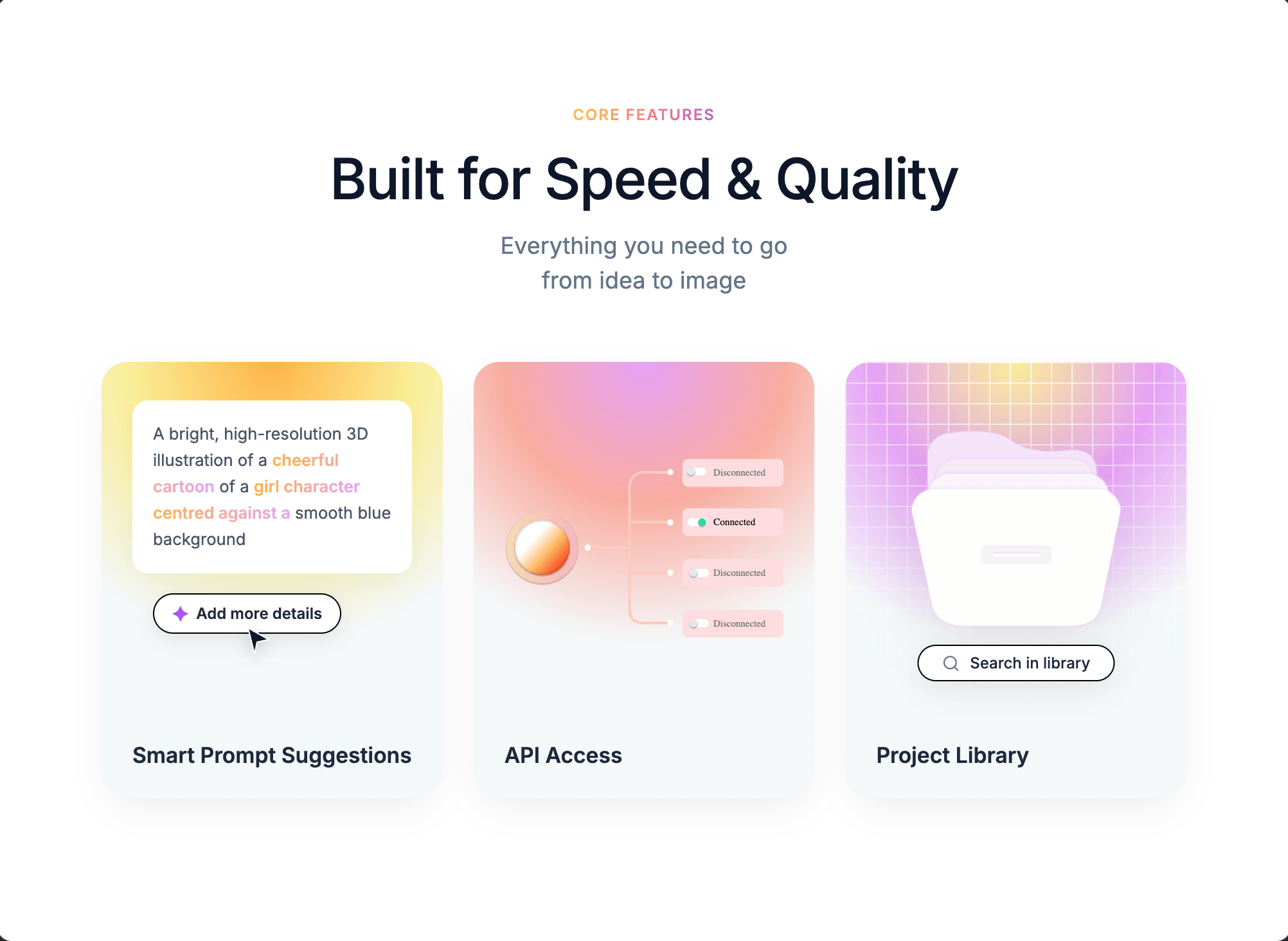
AI Image Generator UI
Build a "Core Features" marketing section as a single centered component with three gradient cards. Use the Inter font family (weights 400, 500, 600) loaded from Google Fonts: https://fonts.googleapis.com/css2?family=Inter:wght@400;500;600&display=swap.
Page shell:
- Body: white background
#ffffff, 80px top/bottom + 20px left/right padding, flex centered, Inter font. - Global reset:
* { box-sizing: border-box; margin: 0; padding: 0; }.
Container (.c1-container): max-width 1100px, full width, text-align center.
Header block:
- Badge (
.c1-badge): text "Core Features", 0.75rem, weight 600, uppercase, letter-spacing 1px, gradient text usinglinear-gradient(90deg, #F5C344, #F28482, #B567C2)with-webkit-background-clip: textand transparent fill. 16px bottom margin. - Title (
.c1-title): "Built for Speed & Quality", font-size 2.75rem, weight 500, color#0f172a, letter-spacing -0.02em, 12px bottom margin. - Subtitle (
.c1-subtitle): "Everything you need to go" +<br>+ "from idea to image", 1.125rem, color#64748b, line-height 1.5, 50px bottom margin.
Grid (.c1-grid): 3 equal columns, 24px gap. Breakpoints: 2 columns under 900px, 1 column under 600px (title scales to 2.25rem).
Card base (.c1-card): 20px border-radius, height 340px, flex column justify-end, relative, overflow hidden, text-align left, background #F4F8F9, shadow 0 10px 30px -10px rgba(0,0,0,0.1). Titles inside (h3): 1.05rem, weight 600, color #1e293b, padding 24px, z-index 2.
Card 1 — Smart Prompt Suggestions (.c1-card-1):
- Background:
radial-gradient(circle at 50% 0%, #FFB347 0%, #F9ED96 30%, #F4F8F9 60%, #F4F8F9 100%). - Prompt box (white, 12px radius, 16px padding, 0.8rem text, color
#475569, line-height 1.6, shadow0 8px 20px rgba(0,0,0,0.04)), absolutely positioned top:30px/left:24px/right:24px. Text: "A bright, high-resolution 3D illustration of a cheerful cartoon of a girl character centred against a smooth blue background" — bold phrases have class.c1-blur-textwith gradientlinear-gradient(90deg, #FFB347, #E5A1F5)as clipped text, weight 600. - "Add more details" pill button: absolute top:180px/left:40px, white background, 1px solid black border, 5px 14px padding, 20px radius, 0.75rem text, weight 600, color
#1e293b, shadow0 4px 15px rgba(0,0,0,0.08), includes✦character styledcolor: #a855f7; font-size: 1remwith 6px gap. - Cursor SVG arrow: absolute top:205px/left:110px, 24x24, fill
#0f172a, white stroke 1px, drop-shadow0 4px 6px rgba(0,0,0,0.2), z-index 10. Path:M4 2L20 11L11 13L9 22L4 2Z. - Heading: "Smart Prompt Suggestions".
Card 2 — API Access (.c1-card-2):
- Background:
radial-gradient(circle at 50% 0%, #E5A1F5 0%, #F8ACA0 30%, #F4F8F9 60%, #F4F8F9 100%). .c1-api-visualabsolutely positioned top:0/left:0/right:0/bottom:70px, flex centered, 24px horizontal padding.- Image (
.c1-network-img): width 100%, height 180px, object-fit contain, margin-top 20px. Source:https://pub-f170a2592d2c4a1485466404c36807be.r2.dev/viktor/network.svg. - Heading: "API Access".
Card 3 — Project Library (.c1-card-3):
- Background:
radial-gradient(circle at 50% 0%, #F9ED96 0%, #E5A1F5 30%, #F4F8F9 60%, #F4F8F9 100%). - Mesh overlay (
.c1-mesh): absolute inset 0, background image = two linear gradients ofrgba(255,255,255,0.8) 1px, transparent 1px(horizontal and 90deg vertical), background-size 16px 16px, masked withradial-gradient(circle at center top, black 0%, transparent 80%)(include-webkit-mask-image). - Folder image (
.c1-folder): absolute top:50px, horizontally centered vialeft:50%; transform:translateX(-50%), width 170px, drop-shadow0 15px 25px rgba(0,0,0,0.08). Source:https://pub-f170a2592d2c4a1485466404c36807be.r2.dev/viktor/library%20icon.svg. - Search pill (
.c1-search): absolute top:220px, centered, white background, 1px solid black, 6px 18px padding, 20px radius, 0.75rem text weight 500 color#1e293b, shadow0 8px 20px rgba(0,0,0,0.06), white-space nowrap, 8px gap. Contains a 14x14 lucide-style search SVG (circle cx=11 cy=11 r=8, line 21,21→16.65,16.65, stroke#64748b, stroke-width 2, round caps/joins) followed by text "Search in library". - Heading: "Project Library".
Note: No animations are defined in this component — it is purely static styling. No JavaScript behavior, no hover effects. Use Supabase if any data persistence is needed, though this section requires none.